Horizontal Baler PLC Fault Diagnosis: A Practical Troubleshooting Guide

Introduction to Horizontal Baler PLC Systems
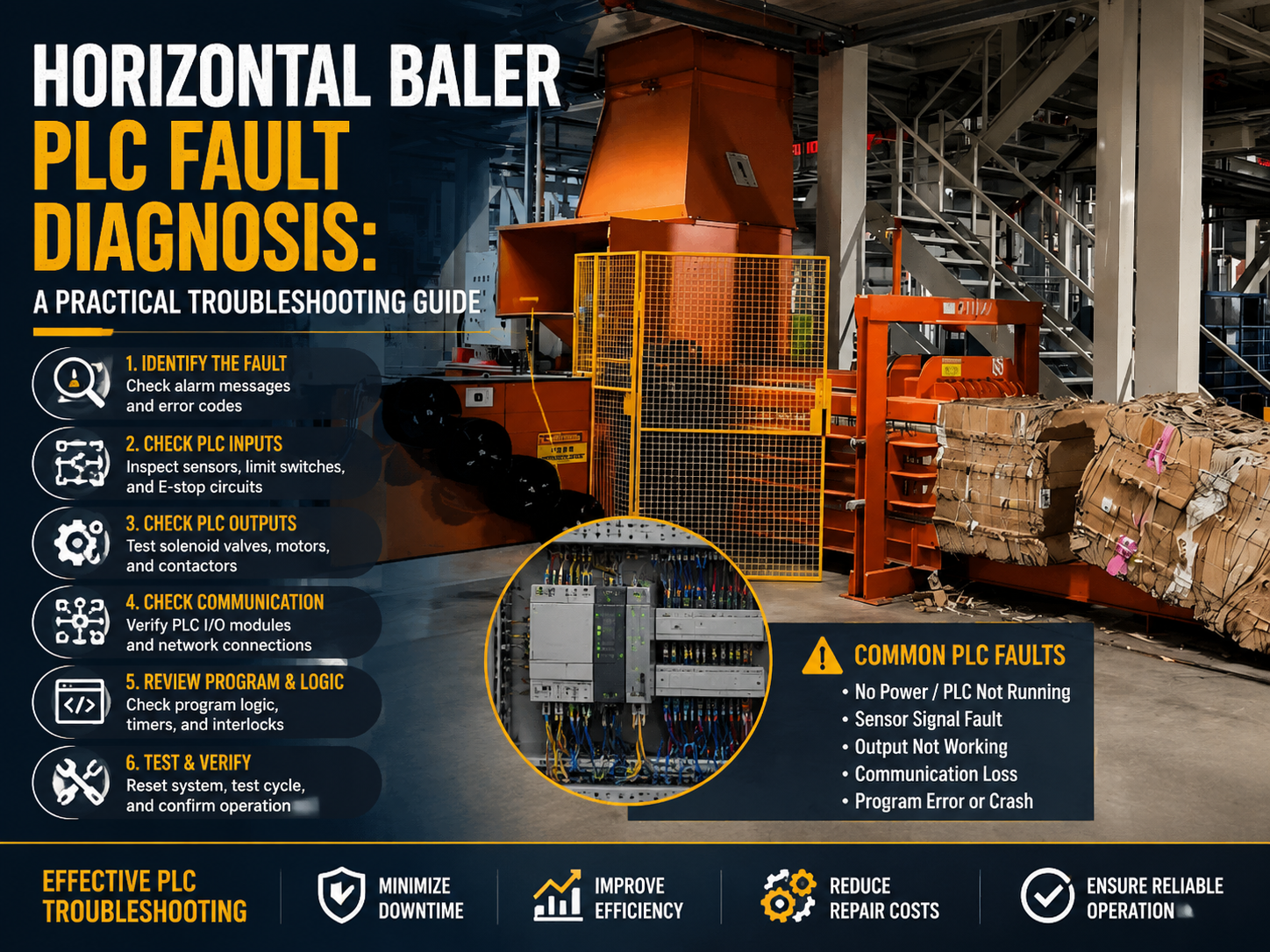
In the modern metal fabrication and recycling industry, the horizontal baler stands as a cornerstone of operational efficiency. At the heart of these robust machines lies the Programmable Logic Controller (PLC), the digital brain that orchestrates hydraulic movements, sensor feedback, and safety protocols. When this system encounters an error, the entire production line can grind to a halt, leading to costly downtime. Understanding Horizontal Baler PLC Fault Diagnosis: A Practical Troubleshooting Guide is essential for maintenance engineers and facility managers who aim to minimize interruptions and maximize equipment lifespan.
The complexity of modern balers, such as those manufactured by HARSLE, requires a systematic approach to diagnostics. A PLC does not merely turn motors on and off; it monitors pressure transducers, proximity switches, and emergency stop circuits in real-time. When a fault occurs, the PLC is often the first component to detect the anomaly, logging error codes that serve as the primary roadmap for repair. By mastering these diagnostic procedures, operators can transition from reactive maintenance to proactive reliability.
This guide explores the intricate relationship between hardware and software in horizontal balers. We will delve into the common failure points, the logic behind PLC error reporting, and the step-by-step methodology required to isolate electrical versus mechanical issues. Whether you are dealing with a communication timeout or a sensor signal loss, this guide provides the technical foundation needed to restore your equipment to peak performance.
Effective troubleshooting is as much about safety as it is about technical skill. Before engaging with any PLC or electrical cabinet, technicians must adhere to strict lockout/tagout (LOTO) procedures. The following sections will break down the diagnostic process into manageable phases, ensuring that you can identify the root cause of a fault without compromising the integrity of the machine’s control logic.
Key Considerations for PLC System Integrity
Before diving into specific fault codes, it is vital to understand the environmental and electrical factors that influence PLC performance. Horizontal balers operate in harsh environments characterized by vibration, dust, and fluctuating temperatures. These conditions can wreak havoc on sensitive electronic components if the control cabinet is not properly maintained. The first step in any Horizontal Baler PLC Fault Diagnosis: A Practical Troubleshooting Guide is to verify the physical health of the control environment.
Electrical noise, or electromagnetic interference (EMI), is a frequent culprit in intermittent PLC faults. Because balers utilize high-power hydraulic motors and contactors, the resulting magnetic fields can induce false signals in low-voltage sensor wiring. Ensure that all communication cables are shielded and properly grounded. If your PLC is reporting erratic sensor inputs, check for loose terminal connections or frayed insulation that might be allowing noise to leak into the control loop.
Power supply stability is another critical consideration. PLCs require a clean, consistent voltage to operate correctly. Voltage spikes or brownouts caused by heavy machinery starting up on the same circuit can cause the PLC to reset or enter a ‘stop’ mode. Installing a dedicated power conditioner or an uninterruptible power supply (UPS) for the control circuit can prevent many of the ‘ghost’ faults that plague industrial balers. Always verify that the input voltage matches the PLC manufacturer’s specifications.
Finally, consider the role of firmware and software updates. While PLCs are generally stable, bugs in the logic program or outdated firmware can lead to unexpected behavior. If you notice a pattern of faults that occur under specific load conditions, consult with your manufacturer, such as HARSLE, to determine if a logic patch or update is available. Documenting these environmental factors creates a baseline that makes future troubleshooting significantly faster and more accurate.
Technical Details: Diagnosing Common PLC Faults
When a fault occurs, the PLC’s diagnostic LEDs are your primary source of information. Most industrial PLCs feature a ‘CPU Fault’ or ‘Error’ light that changes color or flashes when a problem is detected. In Horizontal Baler PLC Fault Diagnosis: A Practical Troubleshooting Guide, we categorize these faults into three main types: hardware failures, communication errors, and logic-based safety trips.
Hardware failures often manifest as a total loss of input/output (I/O) control. If a specific module on the PLC rack stops responding, check the status LEDs on the module itself. A red light typically indicates a blown fuse or a failed internal circuit. Use a multimeter to verify that the 24V DC power is reaching the module. If the power is present but the module remains unresponsive, it may require replacement. Always ensure that the replacement module matches the exact part number and firmware version of the original.
Communication errors are increasingly common in modern balers that utilize fieldbus protocols like Profibus, Modbus, or Ethernet/IP. If the PLC loses contact with a remote I/O block or a Human-Machine Interface (HMI), the system will often trigger a ‘Communication Timeout’ alarm. Inspect the network cables for physical damage, kinks, or oxidation on the connectors. In many cases, simply reseating the cable or replacing a faulty RJ45 connector can resolve the issue immediately.
Logic-based safety trips are the most frequent ‘faults’ that are actually functioning as intended. If the baler stops mid-cycle, the PLC is likely waiting for a signal from a safety gate, a light curtain, or a pressure switch. Use the HMI or a laptop connected to the PLC to monitor the ‘live’ status of these inputs. If a safety gate is closed but the PLC does not see the signal, the fault lies with the sensor or the wiring, not the PLC logic itself. This distinction is crucial for efficient troubleshooting.
Selection Advice: Choosing the Right PLC for Your Baler
When investing in a new horizontal baler or upgrading an existing one, the choice of PLC architecture is paramount. A well-selected system simplifies Horizontal Baler PLC Fault Diagnosis: A Practical Troubleshooting Guide by providing better diagnostic visibility. Look for systems that offer modular I/O, which allows for easier replacement of individual components without needing to rewire the entire cabinet.
Compatibility with industry-standard programming software is another key selection criterion. Proprietary, locked-down systems may prevent your internal maintenance team from accessing the logic, forcing you to rely on expensive third-party service calls. Opt for platforms that are widely supported, such as Siemens, Allen-Bradley, or Mitsubishi, which offer extensive documentation and a large pool of trained technicians.
Consider the diagnostic features built into the HMI. A high-quality HMI should display clear, text-based error messages rather than cryptic numerical codes. For example, instead of seeing ‘Error 404’, the screen should read ‘Rear Gate Proximity Sensor Not Detected’. This level of detail drastically reduces the time required for troubleshooting and allows operators to perform basic resets without calling a specialized engineer.
Finally, evaluate the environmental rating of the PLC hardware. If your baler is located in an outdoor or high-humidity environment, ensure that the PLC modules are conformal coated to resist corrosion. Investing in a robust, industrial-grade PLC from a reputable manufacturer like HARSLE ensures that your control system is built to withstand the rigors of metal fabrication, ultimately leading to fewer faults and a longer operational life.
Maintenance Best Practices for PLC Longevity
Preventative maintenance is the best way to avoid the need for complex fault diagnosis. Establish a quarterly schedule to inspect the PLC cabinet. Use a vacuum or low-pressure compressed air to remove dust from the cooling fans and heat sinks. Overheating is a leading cause of premature PLC failure, as it degrades the internal components and causes logic errors.
Check the tightness of all terminal block connections annually. Vibration from the baler’s hydraulic pump can cause screws to loosen over time, leading to high-resistance connections that generate heat and cause intermittent signal drops. A quick check with a screwdriver can prevent hours of troubleshooting later. Additionally, verify that all grounding straps are secure and free of corrosion.
Maintain a backup of your PLC program. If a PLC module fails and requires a full replacement, you will need to reload the logic program. Keep a current copy of the program on a secure, offline drive and a secondary copy in the cloud. Without a backup, a simple hardware failure can turn into a catastrophic loss of operational capability, requiring a complete rewrite of the machine’s control logic.
Lastly, keep a detailed logbook of all faults and repairs. Tracking the frequency of specific errors helps identify underlying trends. If a particular sensor fails every three months, it may indicate a mechanical alignment issue that is putting excess stress on the component. By analyzing these patterns, you can address the root cause rather than just treating the symptoms, ensuring your horizontal baler remains a reliable asset for years to come.
FAQ: Common Questions About Baler PLC Troubleshooting
- Q: Why does my baler stop suddenly without an error code?
A: This is often caused by a power fluctuation or a momentary loss of a safety circuit signal. Check the power supply stability and ensure all emergency stop buttons are fully engaged and released. - Q: Can I bypass a PLC safety input to keep the machine running?
A: Never bypass safety inputs. This is a severe violation of safety protocols and can lead to serious injury or death. Always troubleshoot the sensor or wiring to resolve the issue. - Q: How do I know if the PLC itself is faulty?
A: If the power supply is correct, the I/O modules are receiving power, but the CPU shows a persistent ‘System Fault’ light that cannot be cleared by a power cycle, the CPU may be defective. - Q: What is the best way to clean the PLC cabinet?
A: Use a non-conductive, anti-static vacuum. Avoid using liquid cleaners or high-pressure air, which can force dust into the sensitive electronic components. - Q: How often should I update the PLC firmware?
A: Only update firmware if you are experiencing specific issues that the update is documented to fix, or if required for security patches. Always perform a full backup before attempting an update.
Conclusion
Mastering Horizontal Baler PLC Fault Diagnosis: A Practical Troubleshooting Guide is a journey of continuous learning. By understanding the interplay between the PLC, the sensors, and the hydraulic actuators, you empower your team to maintain high uptime and operational safety. Remember that the most effective troubleshooting begins with a clean environment, proper electrical grounding, and a systematic approach to reading diagnostic data.
As HARSLE continues to innovate in the field of metal fabrication equipment, our commitment remains to provide machines that are not only powerful but also maintainable. By following the guidelines outlined in this article, you can ensure that your horizontal baler remains a productive, reliable, and safe component of your facility. When in doubt, always refer to your specific machine manual and consult with authorized service technicians to ensure that your repairs are performed to the highest industrial standards.