Horizontal Baler Control Panel Errors: Common Codes and Fixes

Introduction to Horizontal Baler Control Panel Errors
In the high-stakes environment of metal fabrication and industrial recycling, the horizontal baler serves as the backbone of material management. When a machine stops, production halts, and operational costs begin to climb. Understanding Horizontal Baler Control Panel Errors: Common Codes and Fixes is not just a technical necessity; it is a vital component of proactive facility management. HARSLE designs these systems with advanced PLC (Programmable Logic Controller) interfaces to provide operators with real-time diagnostics, yet these codes can often seem cryptic to the uninitiated.
The control panel acts as the brain of your horizontal baler. It monitors hydraulic pressure, sensor alignment, door locks, and motor temperatures. When a fault occurs, the system triggers an error code to prevent mechanical damage or safety hazards. By learning to interpret these signals, maintenance teams can reduce downtime significantly. This guide aims to demystify the common error codes encountered in modern baling equipment, providing actionable steps to restore functionality quickly and safely.
Whether you are operating a fully automatic HARSLE horizontal baler or a semi-automatic unit, the logic behind error reporting remains consistent. Most errors fall into categories such as sensor misalignment, hydraulic system pressure issues, or emergency stop circuit interruptions. Recognizing these patterns allows your team to distinguish between a simple reset and a deeper mechanical failure that requires professional intervention.
As we delve into the technical aspects of these systems, remember that safety is paramount. Always ensure that the main power is locked out before attempting any physical inspection of the hydraulic lines or internal wiring. This article serves as a comprehensive resource for facility managers, maintenance technicians, and operators looking to master their equipment’s diagnostic capabilities.
Key Considerations for Baler Diagnostics
Before diving into specific codes, it is essential to establish a diagnostic protocol. The first step in addressing Horizontal Baler Control Panel Errors: Common Codes and Fixes is to verify the environmental conditions of the control cabinet. Dust, moisture, and extreme temperatures are the primary enemies of industrial electronics. If your control panel is displaying erratic codes, check for signs of overheating or moisture ingress within the cabinet housing.
Secondly, consider the power supply stability. Many modern balers are sensitive to voltage fluctuations. If your facility experiences power surges or brownouts, the PLC may trigger false error codes. Installing a voltage stabilizer or a dedicated line for your baler can often eliminate persistent, non-specific error messages that seem to appear without a clear mechanical cause.
Thirdly, sensor maintenance is a critical factor. Horizontal balers rely on a series of limit switches and proximity sensors to track the position of the ram, the status of the bale door, and the density of the material. If a sensor is covered in debris or metal shavings, it may fail to send a signal, causing the control panel to report a ‘Door Open’ or ‘Ram Out of Position’ error even when the machine appears secure. Regular cleaning of these sensors is a fundamental maintenance task.
Finally, keep a detailed log of all error codes. When an error occurs, note the time, the material being processed, and the specific code displayed. This data is invaluable when contacting technical support. HARSLE support teams can diagnose issues much faster if provided with a history of the machine’s behavior rather than a single, isolated error report. Maintaining a digital or physical logbook is a hallmark of a well-managed fabrication facility.
Technical Details: Decoding Common Error Codes
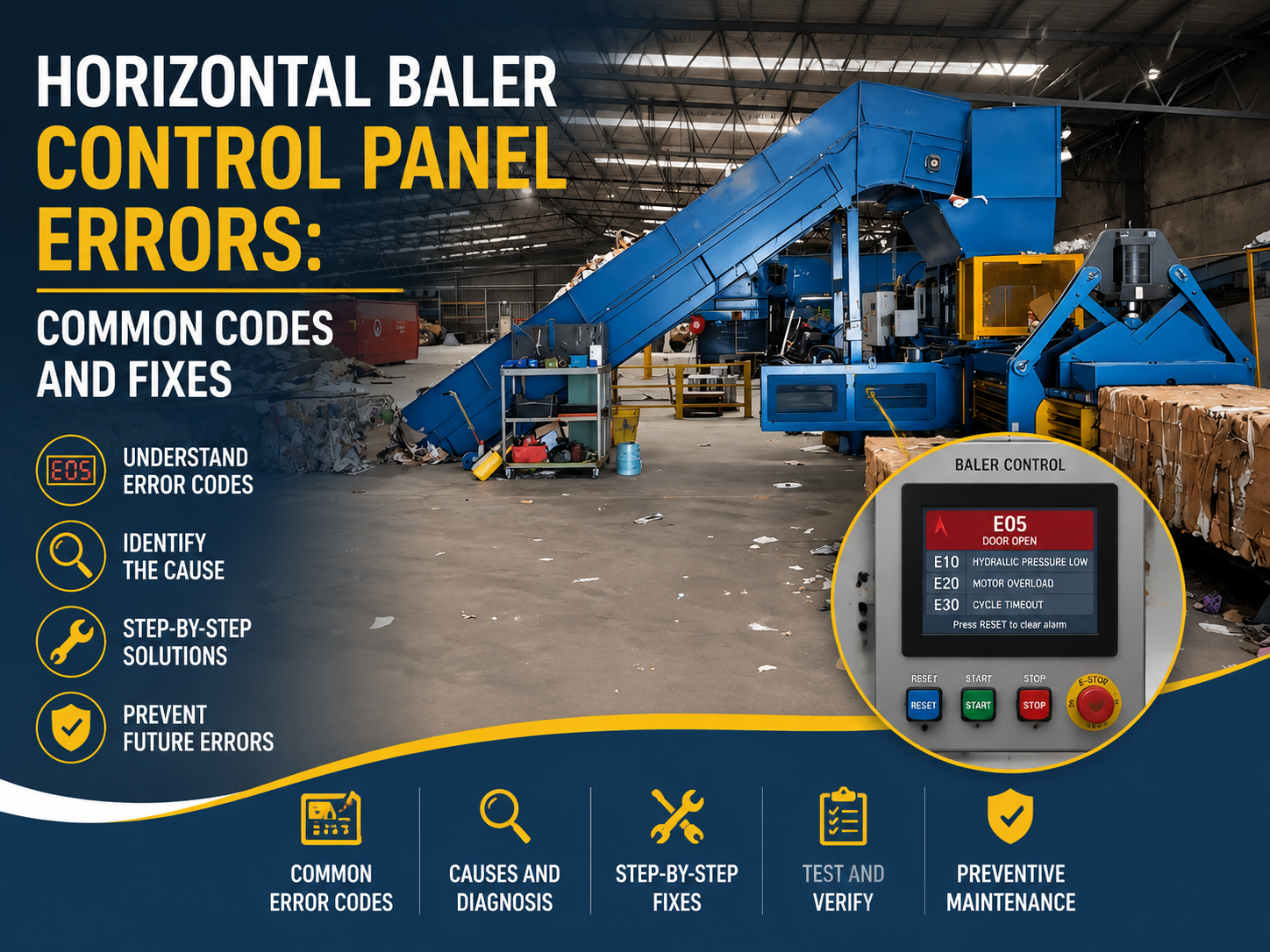
Understanding the specific language of your baler’s control panel is the next step in mastering Horizontal Baler Control Panel Errors: Common Codes and Fixes. While codes vary by model, several industry-standard indicators exist. For instance, ‘E-Stop Activated’ is the most common error. This is not necessarily a failure; it is a safety feature. Check the physical emergency stop buttons on the machine perimeter. Often, a vibration or accidental bump can trigger these, and they must be manually reset by twisting the button to release it.
Another frequent code relates to ‘Hydraulic Pressure Low/High.’ This usually points to the hydraulic pump or the pressure relief valve. If the pressure is too low, the baler cannot achieve the required density for the bale. Check the hydraulic oil level first. If the oil is low, the pump may be drawing air, causing erratic pressure readings. If the oil level is sufficient, the issue may lie with the pressure transducer or a clogged filter that is restricting flow.
The ‘Ram Limit Switch’ error is another common hurdle. This occurs when the PLC does not receive a signal from the limit switch indicating that the ram has reached its home position or its full extension. This is often caused by mechanical misalignment or a loose bracket. Inspect the ram path for any material buildup that might be preventing the ram from completing its full stroke. Clearing the track and ensuring the switch is firmly mounted usually resolves this issue.
Motor overload errors are also common in high-volume environments. These occur when the motor draws too much current, usually due to an overly dense bale or a mechanical jam. If you encounter this, do not repeatedly attempt to restart the machine. Instead, perform a manual reverse of the ram to relieve the pressure on the material. Once the jam is cleared, check the motor’s thermal overload relay to ensure it hasn’t tripped. If it has, allow the motor to cool before resetting the relay.
Selection Advice: Choosing Reliable Equipment
When investing in new metal fabrication equipment, the quality of the control system is just as important as the strength of the steel. When selecting a horizontal baler, look for systems that offer clear, text-based diagnostic displays rather than simple blinking lights. A system that tells you exactly which sensor is failing is significantly more valuable than one that simply indicates a general ‘Fault’ status.
Consider the integration capabilities of the control panel. Modern HARSLE balers often feature remote monitoring capabilities. This allows your maintenance team or the manufacturer to log into the machine’s PLC remotely to diagnose Horizontal Baler Control Panel Errors: Common Codes and Fixes. This feature can save days of downtime by allowing technicians to identify the exact part needed before they even arrive at your facility.
Evaluate the durability of the control cabinet itself. In a metal fabrication shop, the air is often filled with conductive dust. Ensure the control panel is rated for NEMA 4 or IP65 protection, which guarantees that the internal electronics are sealed against dust and liquid spray. A poorly sealed cabinet will lead to premature failure of the PLC and frequent, frustrating electrical errors.
Finally, prioritize manufacturers that provide comprehensive documentation. A machine is only as good as the support behind it. Ensure that the manual includes a detailed appendix of all possible error codes and their corresponding troubleshooting steps. Having this information readily available empowers your staff to handle minor issues internally, keeping your production line moving without waiting for external service calls.
FAQ: Troubleshooting and Maintenance
Q: Why does my baler show a ‘Communication Error’ on the screen?
A: A communication error usually indicates a break in the connection between the PLC and the HMI (Human Machine Interface). Check the communication cables for damage or loose connections. In some cases, electromagnetic interference from nearby heavy machinery can cause this; ensure your control cables are properly shielded.
Q: How often should I calibrate the pressure sensors?
A: Pressure sensors should be checked during your quarterly preventative maintenance schedule. If you notice the bale density is inconsistent, it may be time to recalibrate the transducer to ensure the PLC is receiving accurate data.
Q: Can I bypass an error code to keep working?
A: Never bypass safety-related error codes. Bypassing a door interlock or an E-stop circuit is a severe safety violation that can lead to catastrophic injury. Always resolve the underlying issue rather than attempting to circumvent the safety logic of the machine.
Q: What should I do if the error code is not in the manual?
A: If you encounter an undocumented code, document the exact sequence of events leading up to the error, take a photo of the screen, and contact HARSLE technical support immediately. Providing specific details will help our engineers identify the issue quickly.
Conclusion: Maintaining Operational Excellence
Mastering Horizontal Baler Control Panel Errors: Common Codes and Fixes is an ongoing process of learning and vigilance. By understanding the relationship between the machine’s sensors, its hydraulic system, and the PLC, you can transform your maintenance strategy from reactive to proactive. A well-maintained baler is not only more efficient but also significantly safer for your operators.
Remember that the control panel is your primary tool for communication with the machine. Treat it with the same care you would give to the hydraulic pump or the ram itself. Keep the cabinet clean, ensure the electrical connections are tight, and always prioritize safety protocols when troubleshooting. By following the guidelines outlined in this article, you can minimize downtime and maximize the lifespan of your HARSLE horizontal baler.
Investing time in training your staff to recognize these common error codes will pay dividends in the long run. A team that understands how to troubleshoot minor issues is a team that keeps the production line running smoothly. As you continue to utilize your metal fabrication equipment, let this guide serve as a reference point for maintaining the high standards of performance and reliability that your facility demands.