Single-Shaft Shredder Screen Blockage: How to Identify and Clear It


Introduction to Single-Shaft Shredder Screen Blockage: How to Identify and Clear It
In the demanding world of industrial waste management and metal fabrication, the single-shaft shredder stands as a cornerstone of efficiency. These robust machines are engineered to reduce bulk materials into manageable sizes, facilitating easier recycling and disposal. However, even the most advanced HARSLE equipment can face operational hurdles. One of the most common and frustrating issues operators encounter is the single-shaft shredder screen blockage. Understanding how to identify and clear it is essential for maintaining high throughput and extending the lifespan of your machinery.
A screen blockage occurs when processed material fails to pass through the sizing screen, leading to an accumulation of debris within the cutting chamber. This not only halts production but can also put undue stress on the motor, gearbox, and cutting tools. Recognizing the early warning signs of a clogged screen is the first step in preventing costly downtime. In this comprehensive guide, we will explore the technical nuances of screen maintenance, the diagnostic steps for identifying blockages, and the safest methods for clearing them to ensure your operations remain seamless.
The efficiency of a single-shaft shredder is heavily dependent on the clearance between the rotor knives and the screen. When this gap becomes obstructed, the shredder loses its ability to discharge material effectively. This leads to a phenomenon known as ‘re-shredding,’ where material is repeatedly caught by the rotor, generating excessive heat and noise. By mastering the identification and clearing process, operators can ensure that their HARSLE shredder continues to perform at peak capacity, regardless of the material density or volume being processed.
This article serves as a technical manual for facility managers and maintenance technicians. We will delve into the mechanical design of shredder screens, the impact of material characteristics on blockage frequency, and the best practices for routine inspection. Whether you are processing plastics, wood, or light metals, the principles of screen maintenance remain consistent. Let us explore how to keep your shredding line running smoothly through proactive identification and systematic clearing techniques.
Key Considerations for Shredder Screen Performance
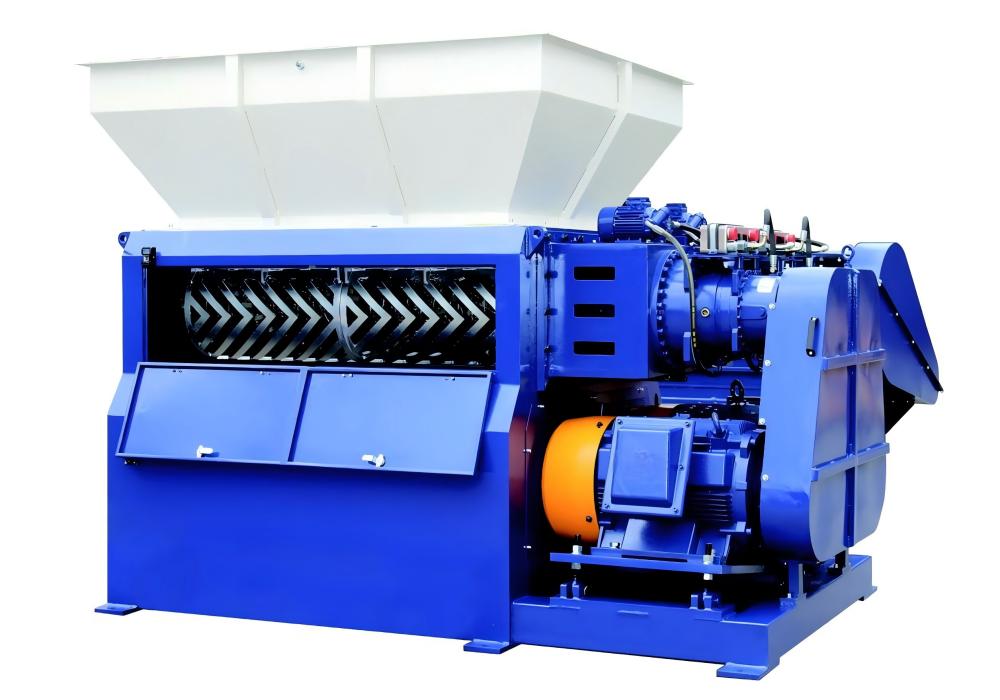
The screen in a single-shaft shredder is a precision-engineered component designed to dictate the final particle size of the output. Its performance is influenced by several key factors, including hole diameter, screen thickness, and the material composition of the screen itself. When these factors are not aligned with the material being shredded, the likelihood of a blockage increases significantly. Operators must consider the moisture content, elasticity, and hardness of the input material before selecting a screen configuration.
One of the primary considerations is the ‘open area’ of the screen. A screen with a high percentage of open area allows for faster discharge but may be structurally weaker. Conversely, a thicker screen with smaller holes provides a finer output but is more prone to clogging if the material is fibrous or sticky. Understanding the balance between throughput requirements and the physical properties of your waste stream is vital for minimizing the risk of screen blockages.
Environmental factors also play a role in screen performance. In high-humidity environments, materials that are typically dry can become tacky, causing them to adhere to the screen surface rather than passing through. Similarly, the presence of contaminants such as tramp metal or non-shreddable items can wedge into the screen holes, creating a ‘bridge’ that prevents other material from exiting. Regular monitoring of the input stream is just as important as the mechanical maintenance of the shredder itself.
Finally, the wear and tear on the rotor knives directly impact the screen. As knives dull, they lose their ability to cleanly shear material, resulting in larger, more irregular pieces that are more likely to get stuck in the screen apertures. A proactive maintenance schedule that includes regular knife sharpening or replacement is therefore intrinsically linked to the prevention of screen blockages. By viewing the shredder as a holistic system, operators can better anticipate and mitigate potential issues before they escalate into full-scale blockages.
Technical Details: How to Identify a Screen Blockage
Identifying a single-shaft shredder screen blockage early can save hours of labor and prevent damage to the drive train. The most immediate indicator is a noticeable change in the acoustic profile of the machine. A healthy shredder produces a consistent, rhythmic sound. When a screen is blocked, the motor often struggles, leading to a deeper, strained hum, or the machine may enter a ‘reverse’ cycle more frequently than usual as the PLC detects high torque resistance.
Another technical indicator is the reduction in output volume. If the feed rate remains constant but the discharge conveyor shows a significant drop in material flow, it is a strong signal that the screen is obstructed. Operators should also monitor the amperage draw on the main motor. A steady increase in current, even when the shredder is not being overfed, suggests that the rotor is working harder to push material against a blocked screen, which is a clear sign of an impending stall.
Visual inspection of the discharge area is also critical. If you notice that the material exiting the shredder is inconsistent in size or that the discharge chute is partially empty while the chamber is full, a blockage is likely present. In some cases, the material may appear ‘packed’ or ‘compressed’ against the screen, which can be observed by looking through the inspection ports or by stopping the machine and performing a visual check of the cutting chamber.
Advanced HARSLE shredders are equipped with sensors that monitor torque and pressure. If your machine is equipped with a modern control panel, look for error codes related to ‘over-torque’ or ‘motor overload.’ These codes are often triggered when the screen is blocked, as the rotor cannot clear the material, causing the system to protect itself by shutting down. By integrating these diagnostic tools into your daily routine, you can identify blockages before they cause mechanical failure.
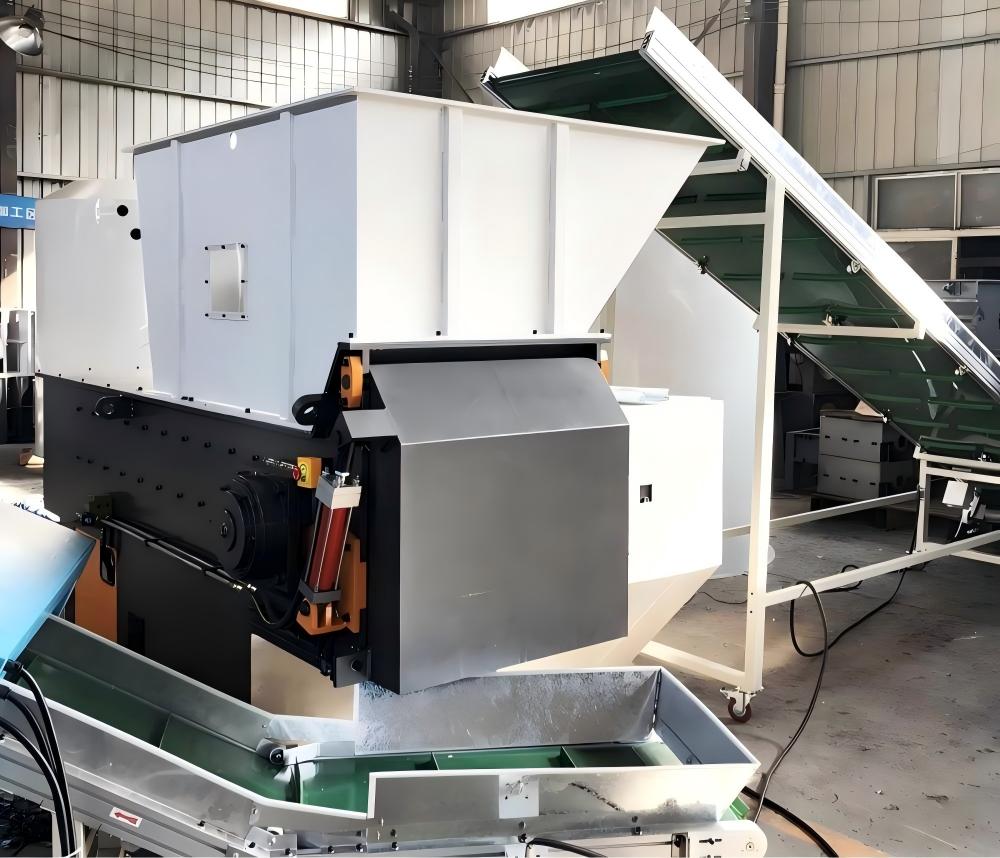
Step-by-Step Guide: Clearing a Screen Blockage
Clearing a screen blockage must be approached with safety as the top priority. Always follow the Lock-Out/Tag-Out (LOTO) procedures before attempting any maintenance. Never reach into the cutting chamber while the machine is powered. Once the machine is safely isolated, the first step is to remove the material currently in the hopper to gain access to the rotor and screen area.
To clear the blockage, start by using a long-handled pry bar or a specialized cleaning tool to dislodge material from the screen surface. In many cases, the blockage is caused by a ‘mat’ of material that has formed over the holes. By breaking up this mat, you can often clear the obstruction without needing to remove the screen entirely. If the material is wedged deep within the holes, you may need to use a pneumatic hammer or a punch to drive the debris through the screen from the inside out.
For more severe blockages, it may be necessary to remove the screen cradle. This involves loosening the hydraulic or mechanical fasteners that hold the screen in place. Once the screen is removed, inspect it for signs of deformation or damage. A screen that has been bent or warped due to excessive pressure will continue to cause blockages and should be replaced immediately. Clean the screen thoroughly using a pressure washer or wire brush to ensure all apertures are clear before reinstalling.
After the screen is cleared and reinstalled, check the gap between the rotor knives and the screen. This gap is critical for performance; if it is too wide, material will not be shredded properly, and if it is too narrow, it may cause friction and heat. Adjust the gap according to the manufacturer’s specifications provided in your HARSLE manual. Once everything is reassembled, perform a test run with a small amount of material to ensure the shredder is operating smoothly before returning to full production.
Selection Advice: Choosing the Right Screen for Your Application
Selecting the appropriate screen is the most effective way to prevent future blockages. When purchasing a single-shaft shredder, consider the nature of your input material. For soft, high-volume materials like plastic film or paper, a screen with larger, staggered holes is often preferred to maximize throughput and prevent the material from ‘blinding’ the screen surface. For harder materials like wood or light metals, a smaller hole diameter is necessary to achieve the desired particle size, but this requires a more robust screen design.
Consider the material thickness of the screen. A thicker screen is more durable and less likely to deform under high torque, but it may be heavier and more difficult to handle during maintenance. HARSLE offers a variety of screen configurations tailored to specific industries. Consult with our technical team to determine if a hardened steel screen or a screen with a specialized coating would better suit your needs, especially if you are processing abrasive materials that cause rapid wear.
Another factor to consider is the ease of screen replacement. Some shredder designs allow for ‘side-loading’ or ‘drawer-style’ screen removal, which significantly reduces the time required for maintenance. If your operation requires frequent screen changes to accommodate different material types, investing in a machine with a quick-change screen system will pay dividends in reduced downtime and improved operator safety.
Finally, always keep a spare screen on hand. A blockage that cannot be cleared quickly can halt your entire production line. Having a replacement ready allows you to swap out the blocked screen, resume operations, and clean the obstructed screen at your convenience. This redundancy is a hallmark of a well-managed industrial facility and is essential for maintaining the high availability of your HARSLE shredding equipment.
الأسئلة الشائعة
- How often should I inspect the shredder screen for blockages?
Inspection frequency depends on the material processed. For high-volume or contaminated waste, a daily visual check is recommended. For cleaner, consistent materials, a weekly inspection may suffice. - What are the signs that my screen is damaged rather than just blocked?
If you notice inconsistent output sizes, excessive vibration, or if the shredder makes a ‘clanking’ sound, the screen may be cracked or deformed. Inspect the screen immediately if these symptoms occur. - Can I use a pressure washer to clean the screen?
Yes, a pressure washer is an excellent tool for cleaning screens, especially when dealing with sticky or oily materials. Ensure the screen is completely dry before reinstalling it to prevent rust. - Why does my shredder keep stalling even after I clear the screen?
If the shredder continues to stall, check the rotor knives for wear. Dull knives can cause the machine to struggle even with a clear screen. Also, ensure the motor drive belts are properly tensioned. - Is it possible to customize the screen hole size?
Yes, HARSLE provides custom screen solutions based on your specific particle size requirements. Contact our support team to discuss your application needs.
Conclusion
Maintaining a single-shaft shredder is a proactive process that requires attention to detail and a thorough understanding of your equipment. A single-shaft shredder screen blockage is a common challenge, but by learning how to identify the signs—such as increased motor load, reduced output, and unusual noise—you can address the issue before it impacts your bottom line. Following the systematic clearing procedures outlined in this guide ensures that your maintenance team can work safely and efficiently, minimizing downtime.
Remember that the best way to manage blockages is to prevent them through proper screen selection and regular maintenance of the cutting system. By choosing the right screen for your material and keeping your rotor knives sharp, you create a shredding environment that is both productive and reliable. HARSLE is committed to providing the industrial machinery and support necessary to keep your operations running at peak performance.
As you continue to optimize your metal fabrication and recycling processes, keep this guide as a reference for your maintenance team. Investing time in understanding your equipment’s needs is the surest path to long-term success. Should you encounter persistent issues or require specialized parts, our team at HARSLE is always ready to assist you in maintaining the integrity and efficiency of your shredding line.